How Suzy's CEO Turns 25,000 Hours of Sales Calls into Automated Marketing and Coaching with One Zapier Workflow
Discover the mega-workflow that Suzy CEO Matt Britton built to transform a single customer call transcript into automated call summaries, churn alerts, AI-powered coaching, and SEO-optimized blog content. Learn how to leverage your company's existing data to fuel your entire go-to-market strategy.

Claire Vo
oday’s episode is a special one. We often have guests on the show who walk us through two or three distinct, creative workflows. But today is different. I sat down with Matt Britton, the founder and CEO of the consumer insights platform Suzy, and he shared the one mega-workflow that powers his entire go-to-market team.
Matt is a fascinating founder. He’s been on the cutting edge of digital marketing for decades, having sold the first ads on Facebook and bought some of the first Google keywords. He's not an engineer, but he has a real knack for spotting a business problem and figuring out how technology can solve it. His latest book, Generation AI, even digs into how this new wave of technology will reshape our world. So when his sales team told him they felt lost and couldn't find the information they needed to serve customers better, he didn't just hand off the problem—he rolled up his sleeves.
He found a treasure trove of data that was hiding in plain sight: 25,000 hours of recorded customer calls from Gong. He realized these transcripts were the ultimate source of truth for understanding what customers need, how they feel, and the exact language they use to describe their problems. Instead of building a bunch of small, disconnected automations, he built one massive, end-to-end system in Zapier that takes a single call transcript and extracts an incredible amount of value from it.
We're going to break down this entire workflow, step by step. You'll see how Matt turns one conversation into a rich call summary, a churn prediction alert, automated coaching for his team, a ready-to-send follow-up email, keywords for Google Ads, and even a fully-written, SEO-optimized blog post. It's a fantastic example of getting the most out of a single asset and shows how leaders can—and should—get hands-on with AI.
The Go-To-Market Mega-Workflow: From Gong Call to Company-Wide Intelligence
Matt's strategy is built on a simple idea: your customers are constantly telling you what they want. The trick is to capture, analyze, and act on that information at scale. This workflow is his solution, creating an operating system that revolves around the voice of the customer.
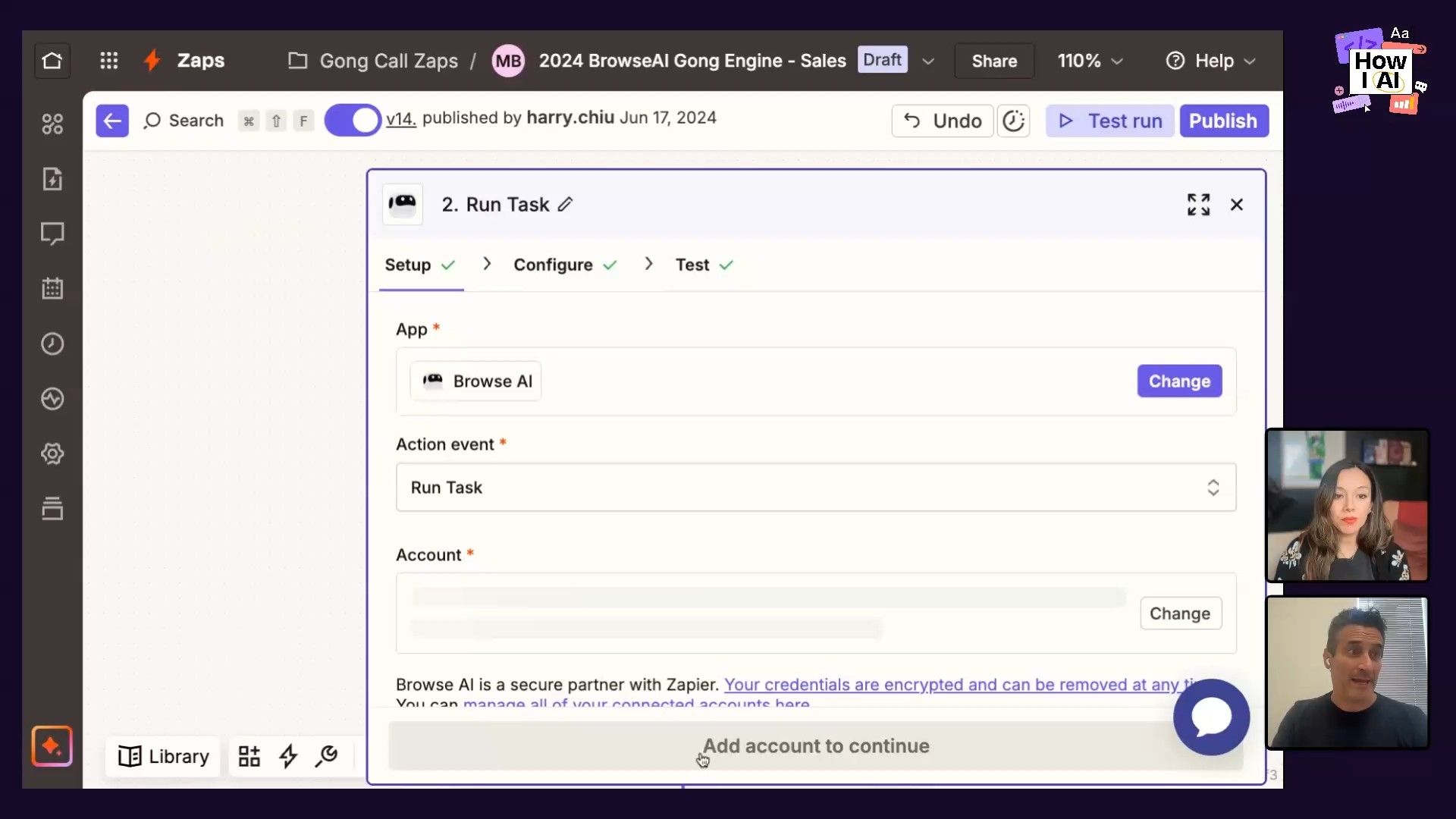
Step 1: The Trigger - Hacking Gong Data with Browse AI
The first hurdle Matt had to clear was simply getting the data out of Gong and into Zapier. At the time, a direct trigger for what he needed didn't exist. A lot of people might have stopped there, but Matt found a clever way around it.
"I could have given up, Claire, like at that point. That one step probably took me the longest... But you just have to know that there's a way. Just 'cause the tool doesn't do it, doesn't mean it can't be done."
Here’s how he did it:
- Identify the URL Pattern: Matt noticed that every Gong call transcript had a unique URL, and the only part that changed was a specific
call_idat the end. - Trigger on New Calls: He set up a Zap to trigger whenever a new call was logged in Gong. This initial trigger provided the essential
call_id. - Scrape with Browse AI: He then used a tool called Browse AI to scrape the page. The Zap passes the
call_idto Browse AI, which builds the full URL, goes to the Gong page, and pulls the entire raw transcript.
This two-part trigger was the linchpin for the entire system. It’s a great example of how you can stitch tools together to create a data pipeline even when a direct integration is missing.
Step 2: Data Prep and Enrichment
Once Zapier has the raw transcript, the next step is to clean it up and add more context.
- Delay Step: Matt adds a two-minute delay right at the start. This is a great tip for complex Zaps: it gives the system a buffer to make sure all the data from the trigger has been fully received before the next steps run, which helps prevent errors.
- Format Text: He uses a Zapier Formatter step to strip out any HTML tags that came along with the web scrape, leaving just the clean text of the conversation.
- Enrich with Lookups: The transcript itself is useful, but it becomes much more valuable when connected to other business data. Matt uses a Google Sheets lookup to link the Gong call ID to internal info, like the customer's brand name, the salesperson's name, their manager, and their Slack user ID. He’s essentially creating a complete profile for the interaction as it happens.
Step 3: Core Analysis - Generating Summaries and Sentiment Scores
This is where the Large Language Model (LLM) gets its first job. Using a ChatGPT (GPT-4 Turbo) action in Zapier, Matt feeds the cleaned transcript into a detailed prompt to pull out key insights.
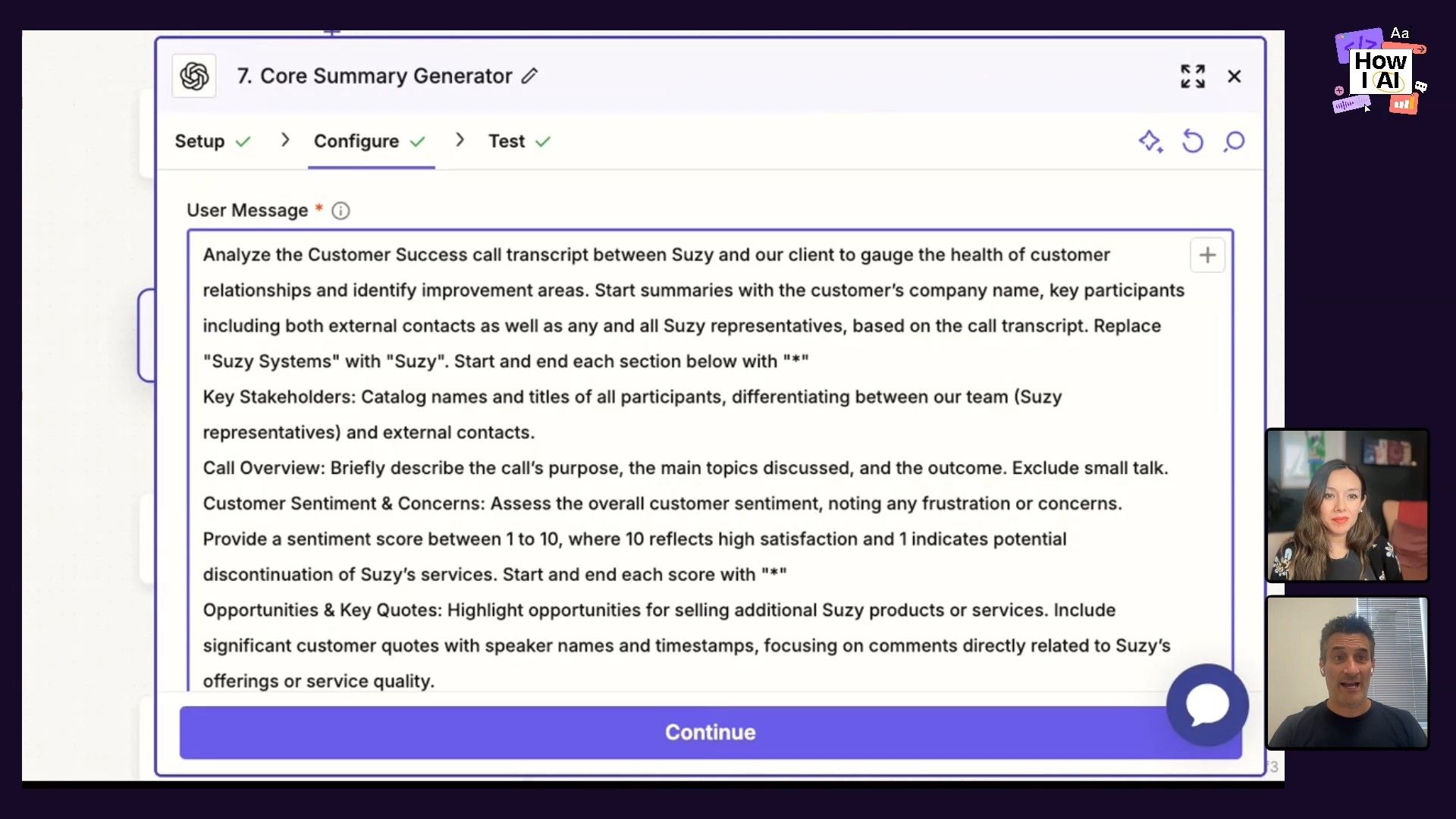
The prompt asks the model to do several things at once:
`Analyze the customer success call transcript between Suzy and our client to gauge the health of customer relationships and identify improvement areas. Start summaries with the customer's, company name key participants... describe the call's purpose, the main topics discuss, and the outcome exclude small talk... Assess the overall customer sentiment, noting any frustrations or concern. Provide a sentiment score from 1 to 10 where 10 reflects high satisfaction and 1 indicates potential discontinuation of our services. Also one great thing the customer successfully did on the call... what are some things that they actually could have done better, and then list the next steps.
`This single prompt generates a structured summary, a numerical sentiment score (which Matt says is a great predictor of churn), opportunities, and action items.
Step 4: Internal Distribution and Alerts
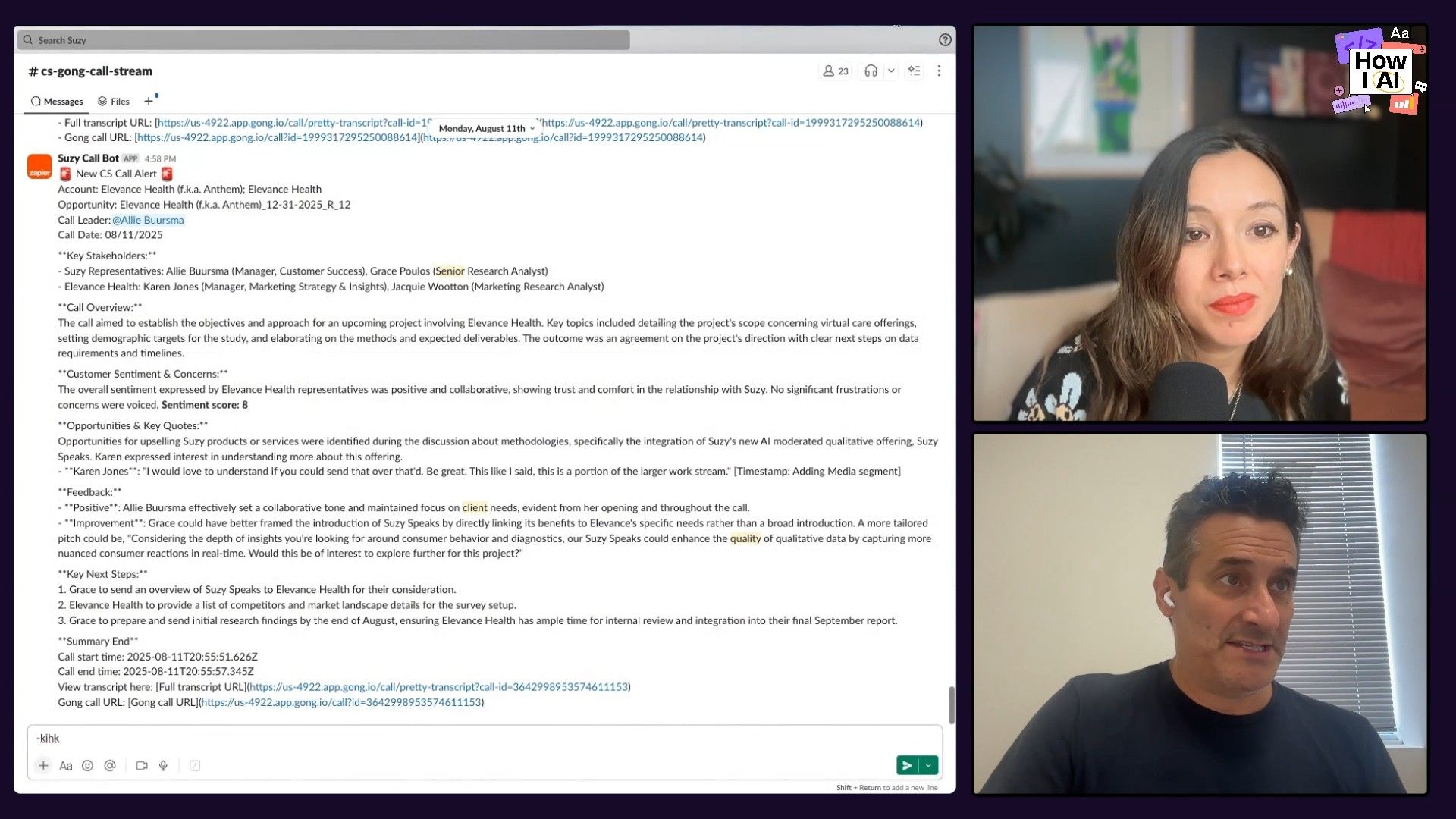
Once the analysis is done, the information is sent to the team in real-time through Slack.
- General Channel: A summary of every call gets posted to a main customer success channel. This gives the whole company, including Matt, a live feed of customer conversations and sentiment.
- Churn Early Warning System: If the AI-generated sentiment score is below a certain number (say, less than 7), a notification automatically goes to a separate, high-priority channel called "Churn Early Warning System." This makes sure potential risks are flagged immediately so the team can step in.
Step 5: AI-Powered Coaching and Performance Tracking
The workflow does more than just monitor customers; it also helps the team improve. A separate LLM step acts as an AI coach, giving personalized feedback directly to the employee who was on the call.
"It actually creates a feedback note to the person on the call... 'Here's what you did right, here's what you did wrong,' and actually sends it to them right afterwards so they understand how to get better."
The prompt for this step analyzes how the employee performed, pointing out what went well (like asking great questions) and what could be better (like interrupting the customer). This feedback isn't just sent to the individual; it's also logged in a central dataset. This lets managers track performance trends over time and makes performance reviews more objective and based on actual data.
Step 6: Fueling the Marketing Engine
The customer insights don't just stay internal; they're also funneled directly into the marketing strategy.
- Keyword Extraction: Another LLM call analyzes the transcript to find keywords and phrases the customer used when describing their problems and needs. These keywords are then automatically added to the company's Google Ads campaigns. This creates a closed-loop system where the exact language of happy customers is used to attract new ones just like them.
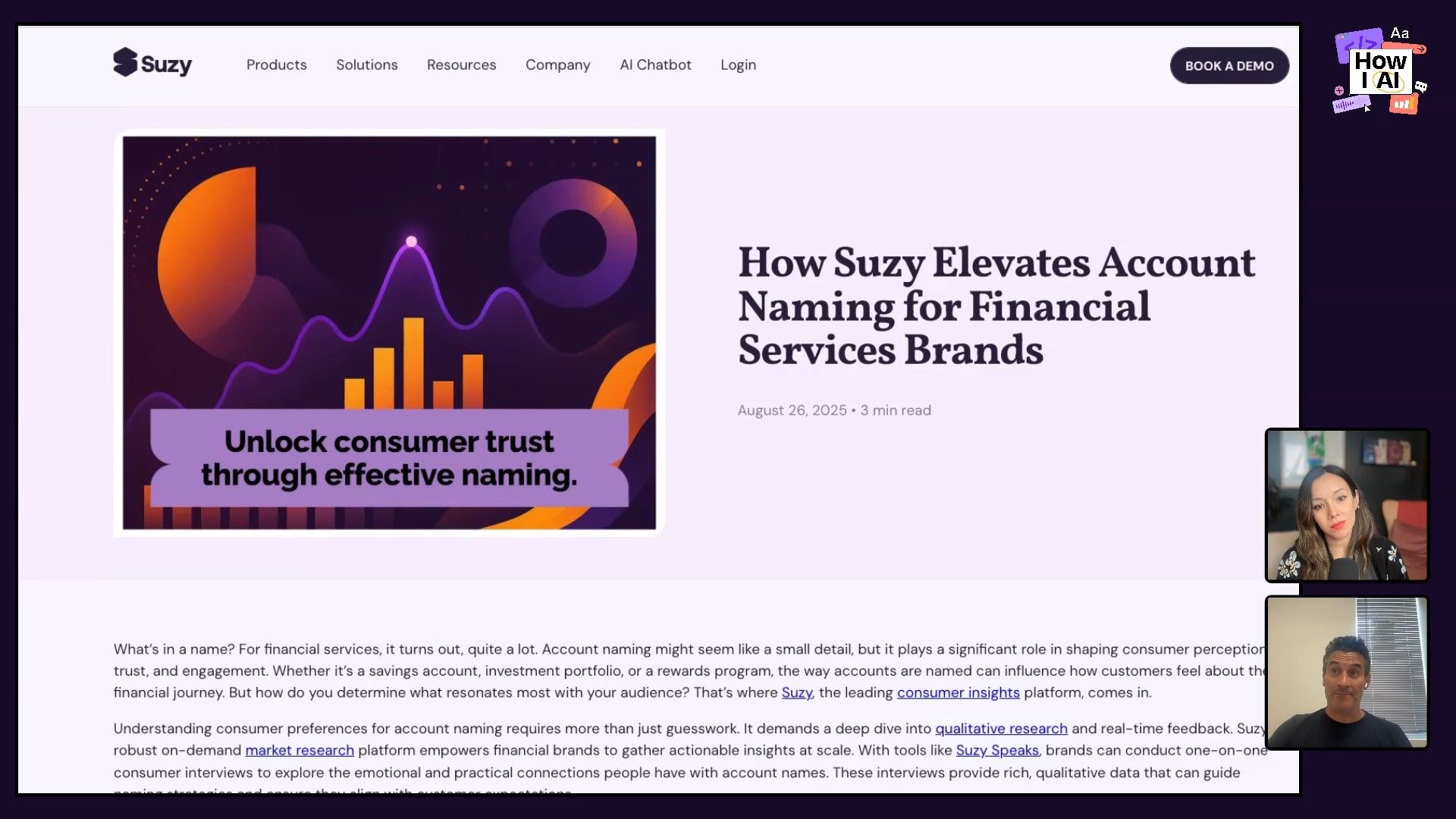
- Automated Content Generation: This might be the most ambitious part of the whole system. The workflow takes the call transcript, and an LLM redacts all personally identifiable information—the customer's name, company, and specific strategic details—to protect their privacy. It then rewrites the anonymized conversation into an SEO-optimized blog post about the business problem they discussed. It even generates a headline, a graphic, and a call-to-action. The post is scheduled to be published 21 days later, creating a continuous stream of content that now includes over 10,000 blog posts, all sourced directly from real customer challenges.
Step 7: Closing the Loop with Automated Follow-Ups
Finally, to help the sales and customer success teams be more efficient, the workflow includes a "Follow-up Email Writer." It takes the context from the call and drafts a detailed, personalized follow-up email. The draft is sent to the employee, who can then review, edit, and send it out. This keeps a human in the loop for all external communication while saving a huge amount of time.
Conclusion: The Rise of the Super IC
What Matt has built is more than an automation; it's a new way of running a business. By taking a single, data-rich asset and building a system around it, he has created an incredible advantage for his entire go-to-market team. The insights from one call improve coaching, prevent churn, generate marketing content, and fuel ad campaigns.
This workflow really highlights a few key ideas taking shape in the age of AI. First, the most valuable data you have is often the data you're already creating. Second, leaders who get their hands dirty and learn to build with these tools will have a huge advantage. You don't need to be a coder to put together complex systems like this. And lastly, it changes how we should think about building teams. As Matt said, the future belongs to proactive problem-solvers—the "super individual contributors" who can spot a need and use AI to build the solution.
I hope this breakdown inspires you to look for your own untapped data sources. What's the single most valuable asset in your business, and how many different ways can you use AI to get more out of it? Now go build something!
Thanks to our sponsors!
I'm so grateful for the support of our incredible sponsors who make this show possible.
- Brex—The intelligent finance platform built for founders
- Zapier—The most connected AI orchestration platform
Episode Links
Try These Workflows
Step-by-step guides extracted from this episode.

How to Automatically Generate Marketing Content from Customer Calls
Turn your customer conversations into a powerful content engine. This workflow uses Zapier and an LLM to extract Google Ads keywords and write fully anonymized, SEO-optimized blog posts based on real customer problems.

How to Build an Automated AI Sales Coaching System from Call Transcripts
Automatically analyze your team's performance on customer calls with an AI coach. This workflow uses Zapier and ChatGPT to provide personalized feedback directly to employees and log performance data for managers.

How to Automate Customer Call Analysis and Predict Churn with Zapier
Automatically scrape call transcripts from a tool like Gong, use ChatGPT to analyze sentiment and generate summaries, and send real-time churn alerts to your team in Slack with a powerful Zapier workflow.


