How Al Chen Uses Claude Code and 15 Repos to Answer Any Customer Question
Galileo's Al Chen reveals two powerful AI workflows: one that queries 15 code repositories to generate hyper-personalized customer answers, and another that turns Slack chats into a public knowledge base.

Claire Vo
On this episode of How I AI, I was so excited to sit down with Al Chen, a field engineer at Galileo. What Al is doing is something I think every customer-facing team at a technical company needs to see. He's on the front lines, dealing with enterprise customers who have incredibly deep, nuanced questions about how Galileo's complex, multi-service platform works. The kind of questions that public documentation, no matter how well-written, can never fully answer.
Al, who doesn't have a traditional engineering background, faced a common problem: he couldn't do his job effectively by just referencing the official docs. His customers, often developers themselves, wanted to know the step-by-step reality of how different services cascade together. Instead of constantly interrupting his engineering team, he developed a system that treats Galileo's entire codebase—all 15 repositories—as the ultimate source of truth.
In our conversation, Al walked me through two brilliant workflows. First, how he uses Claude Code within VS Code to query the entire codebase, blending it with documentation from Confluence and his own customer-specific notes to deliver hyper-personalized deployment plans. Second, he showed me how he uses a tool called Pylon to turn reactive customer support conversations in Slack into a constantly growing, public knowledge base. These aren't just theoretical ideas; they are practical, day-to-day systems that have dramatically improved customer experience and nearly eliminated his reliance on pinging engineers for answers.
Workflow 1: Turning Your Entire Codebase into a Customer Support Engine
The fundamental problem Al faced is one many of us in technical product companies know well. Our products are complex, often consisting of many microservices, and the official documentation provides a high-level map. But customers live in the territory, and they need to know the specific path. As Al put it, when he was just using the docs, the answers he got weren't what his customers were looking for. He realized the real answers were in the code.
Step 1: Consolidate All Repos into a Single Workspace
Galileo isn’t a monorepo; it has over 15 individual repositories that correspond to different services in their architecture, like UI, API, and AuthZ. The first key step for Al was to get all of this code into one place where an AI could see it. He cloned every single repository into a parent Galileo directory on his local machine.
He then opened this top-level directory in VS Code. This is a crucial but often overlooked trick. By opening the project at the multi-repo level, any query he runs with Claude Code can traverse across all the different services. He doesn't have to jump between 15 different windows; the AI has the full context of the entire platform's codebase at once.
Step 2: Keep the Codebase Continuously Updated
Code is a living source of truth, which means it changes daily. Manually running git pull origin main on 15 different repos is tedious and unsustainable. Al needed an automated way to ensure his local code was always current. So, he asked Claude Code for help.
He used a simple prompt:
help me figure out a way to pull the latest main branches into my local repos
Claude Code generated a 16-line script that Al saved as pull_all. Now, he just runs this script every morning, and it automatically updates all 15 repos to the latest version of the main branch. This ensures that the answers he generates are based on the most current state of the product, not on outdated docs or an old version of the code.
Step 3: Query Across Code, Docs, and Custom Notes
With his environment set up, Al can now answer incredibly specific customer questions. He created a custom Claude Code command called DPL (for 'deploy') that intelligently pulls from multiple sources.
Here’s an example query he might run for a customer with specific needs:
DPL, my customer, cannot use CDs and they are using Google Secrets Manager and want to deploy. The wizard image, give me a step by step process on how to do it.
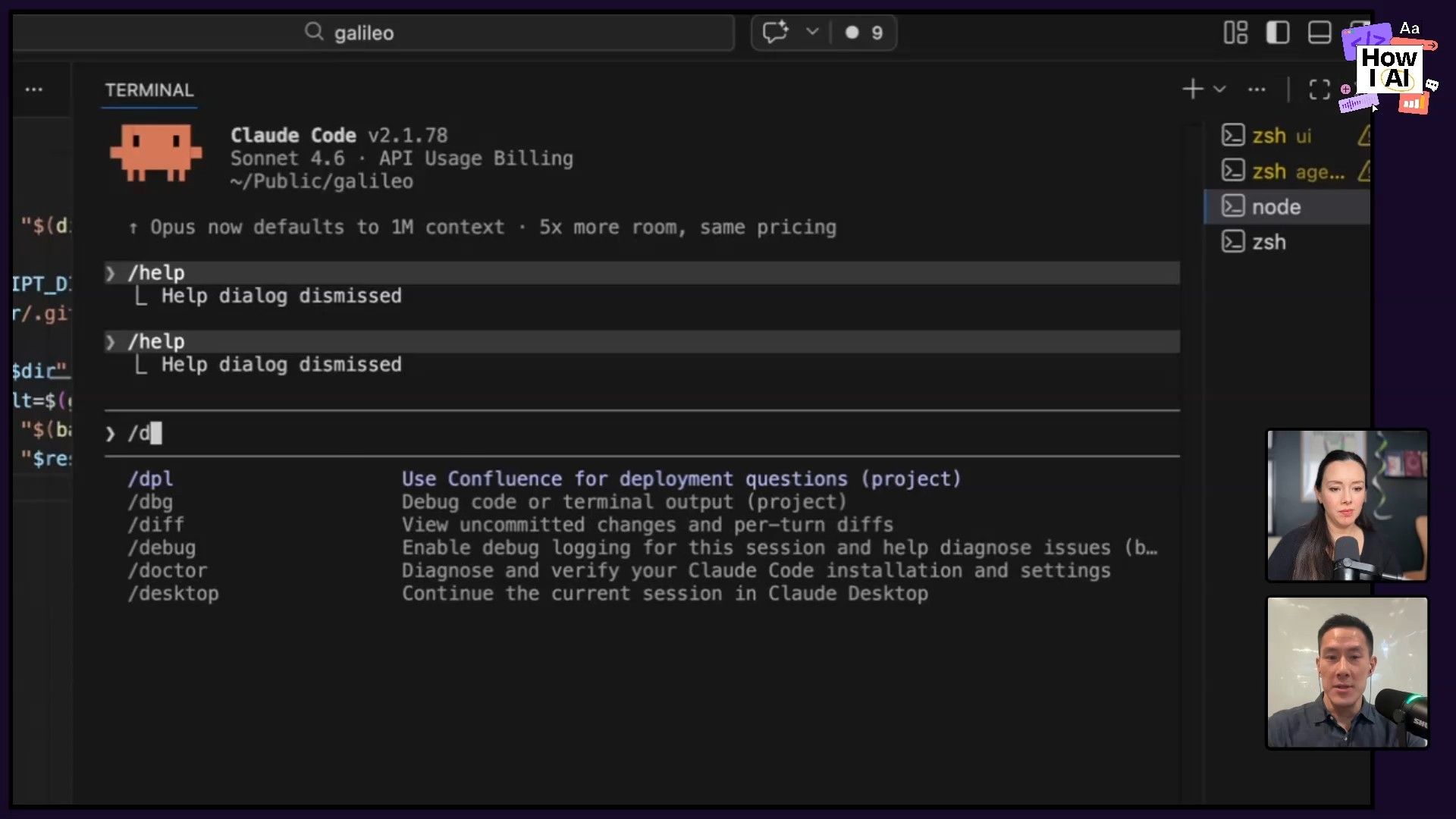
When this command runs, Claude Code does a few things:
- It checks Confluence first. Al has it configured with an MCP (Multi-Context Prompt) to look at their Confluence space for general deployment documentation.
- It queries the codebase. If the docs aren't enough, it dives into the 15 code repositories to understand the exact implementation details.
- It references the "Customer Quirks" page. This is a masterstroke. Al maintains a single, ever-growing Confluence page with bullet points detailing the unique security and infrastructure requirements for each enterprise customer. Things like how they handle secrets, namespaces, or service-to-service encryption.
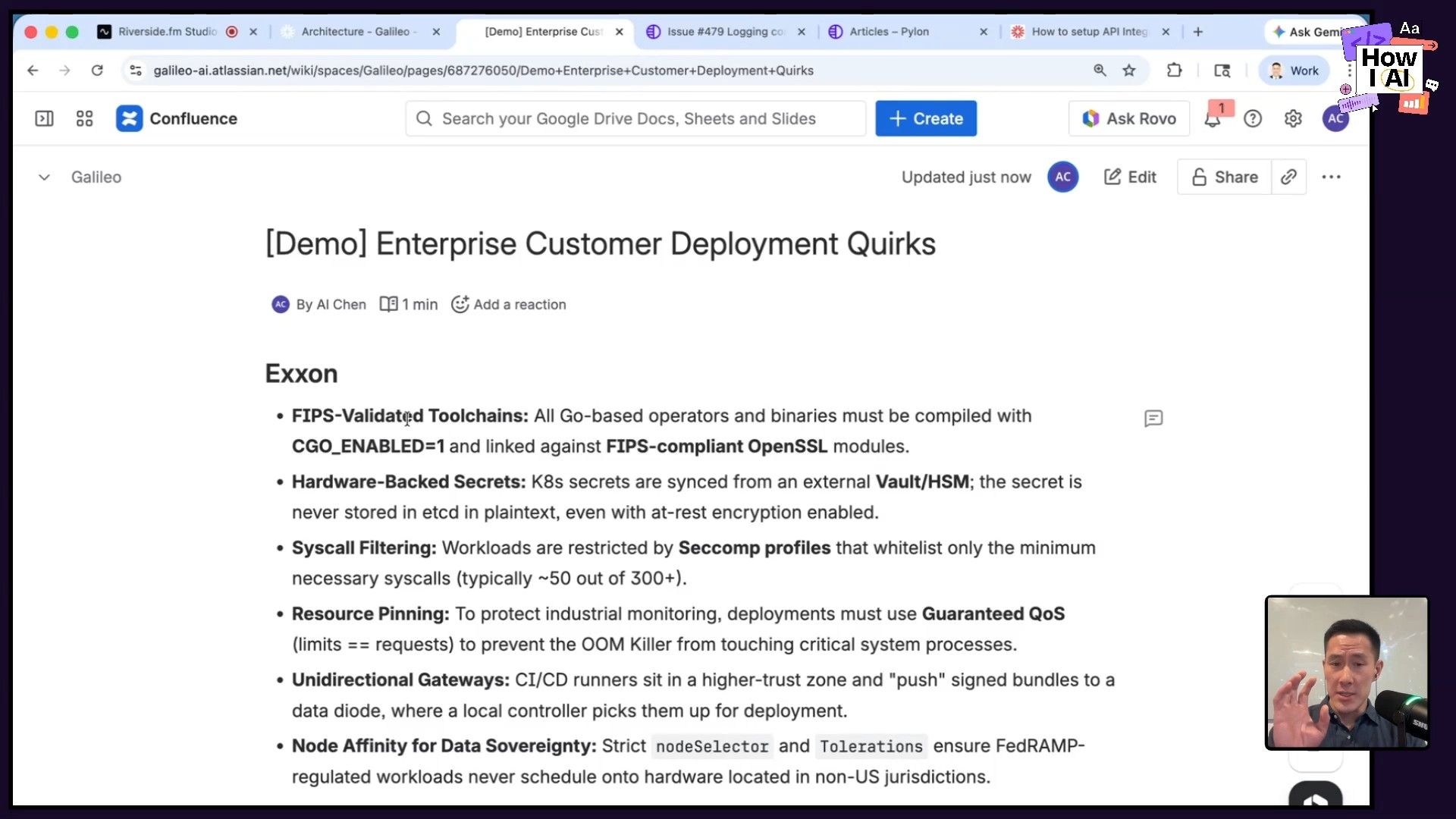
By mentioning the customer in his prompt, Claude Code cross-references the quirks page and generates a deployment plan that is not just technically accurate according to the code, but also hyper-personalized to that customer’s specific, air-gapped environment. The result is a level of customer trust and service that generic documentation could never achieve.
Workflow 2: Building a Virtuous Cycle from Slack Support
Al's first workflow is about proactive, deep support. But what about the reactive, day-to-day questions that come through shared Slack channels? This is where his second workflow comes in, which focuses on making sure the knowledge generated from solving one customer's problem benefits everyone.
As I love to say, this is a perfect example of the "and then..." discovery process. You solve a customer's problem in Slack, and then what? In a world with infinite resources, you'd turn that answer into a help article, share it with the team, and add it to your knowledge base. With AI, that's no longer a fantasy.
Step 1: Monitor and Identify Key Slack Conversations
Galileo uses a tool called Pylon to manage all their external customer Slack channels. When a valuable conversation happens—like a deep dive into their callback function, as Al showed me—it's flagged as a source of potential knowledge.
Step 2: Generate a Help Article from the Thread
Instead of manually summarizing the conversation, Al uses Pylon's built-in AI feature. With a single click on "Generate article draft," the tool reads the entire Slack thread—the questions, the back-and-forth, and the final solution—and creates a well-structured help article.
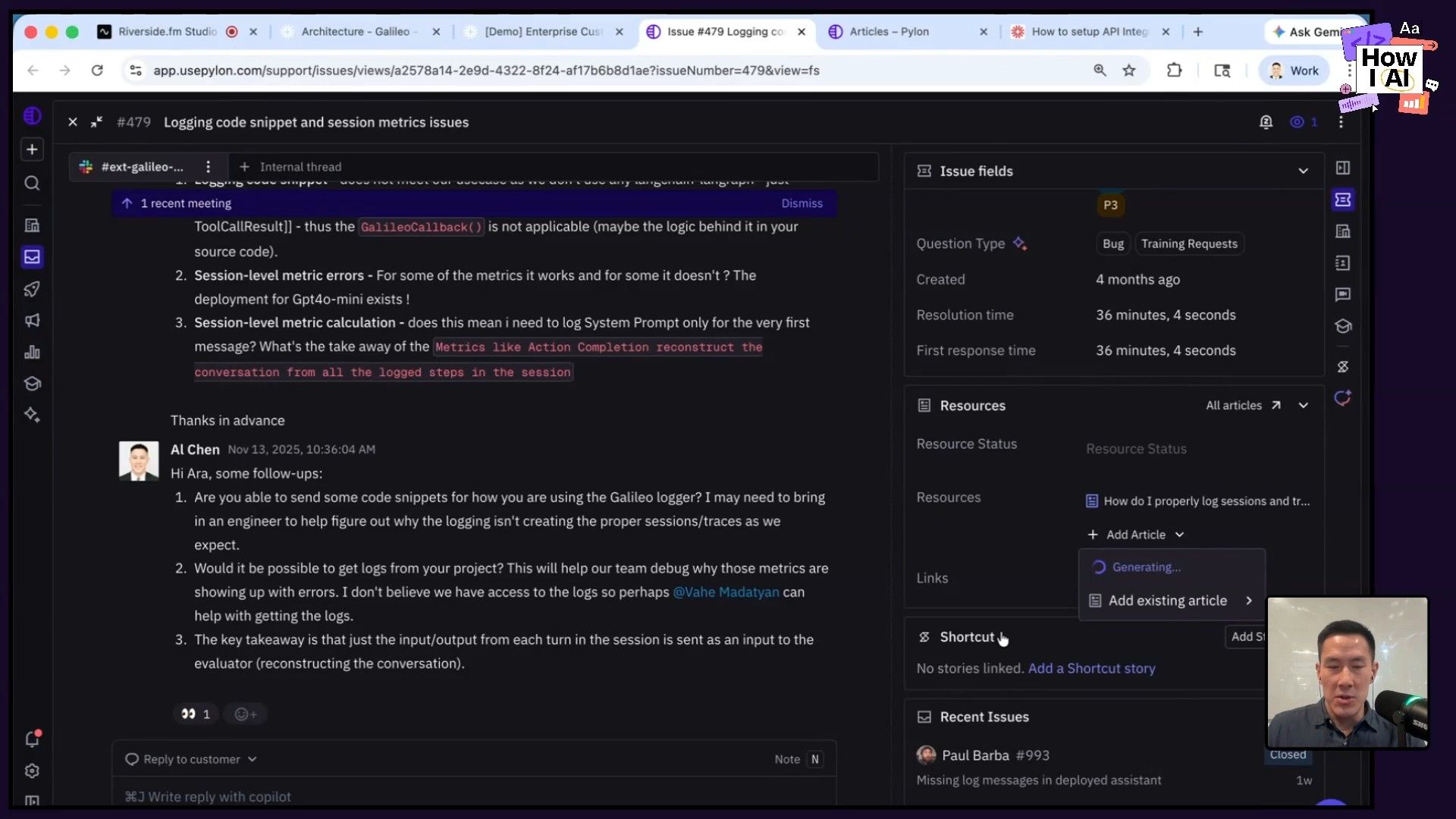
The AI automatically abstracts away any customer-specific information, turning a private conversation into a general, reusable piece of documentation. You could do this by copying and pasting into any LLM, but the beauty of Pylon is that it's all integrated directly into the support workflow.
Step 3: Publish to a Living Knowledge Base
Once the draft is generated, it gets a quick human review and is then published to Galileo's public knowledge base. This creates a virtuous cycle. A single question from one customer creates an asset that can now help hundreds of future customers who have the same question.
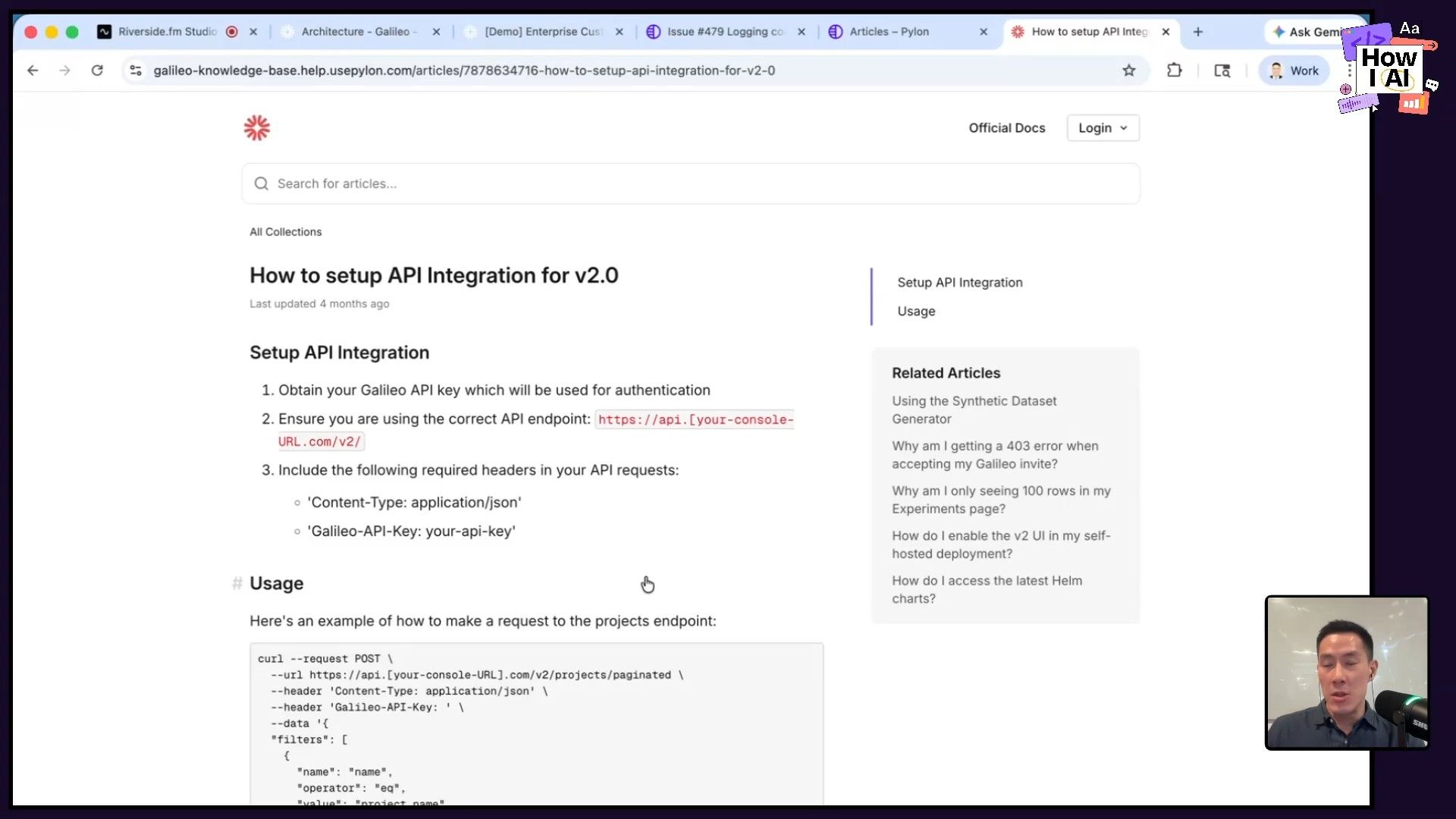
This knowledge base becomes a living document, often more in-depth and up-to-date than the official, polished docs, which require a full PR and approval process. It’s a scrappy, fast, and incredibly effective way to scale customer knowledge.
Conclusion: Competing on Experience
What Al has built at Galileo is a powerful demonstration that AI's competitive advantage isn't just about shipping product faster. It's about fundamentally changing how you show up for your customers. By combining the ground truth of the codebase with the specific context of a customer's environment, he delivers a concierge-level experience that builds immense trust.
His workflows also highlight a critical shift: the era of the hard skill is here. For customer-facing roles to be truly effective, they need to be more technical. They need to be comfortable with tools like GitHub, the command line, and reading code, even if they aren't writing it. The AI acts as the great equalizer, a super-patient teacher that can explain anything from Kubernetes concepts to a specific function in your code.
Ultimately, Al's success is driven by curiosity. He's relentless in asking the AI to "think harder," to justify its answers, and to explain the 'why' behind the code. By pulling on that thread, he not only solves his customers' immediate problems but also continuously deepens his own expertise. I encourage everyone in a customer-facing role to try these workflows—start with your code, stay curious, and see how you can transform your customers' experience.
---
Thank you to our sponsors!
This episode of How I AI is brought to you by:
- [Orkes](https://www.orkes.io/)—The enterprise platform for reliable applications and agentic workflows
- [Tines](https://www.tines.com/)—Start building intelligent workflows today
---
Episode and Guest Links
Where to find Al Chen:
- LinkedIn: https://www.linkedin.com/in/alchen
- Company: https://www.rungalileo.io
- Galileo is hiring Field Engineers! If this episode inspired you, check out their open roles.
Where to find Claire Vo:
- ChatPRD: https://www.chatprd.ai/
- Website: https://clairevo.com/
- LinkedIn: https://www.linkedin.com/in/clairevo/
- X: https://x.com/clairevo
Tools Referenced:


